
The first stage of almost every successful penetration test is the reconnaissance phase. During this phase of an engagement we scour publicly accessible resources for information about the target that will provide insight and direction for later phases. We look for information that was made public intentionally, and sometimes unintentionally, that tells us more about the organization than we knew before.
Here are some examples of information often found during the reconnaissance phase:
- Lists of employees for targeted social engineering
- Website sub-domains that contain additional sites
- Forum posts from employees containing code snippets, applications in use, and specific technologies
- Employee passwords and hashes from recent 3rd party compromises
/usr/share/ directory but you can install it anywhere you’d like. To begin, enter the following command to pull down the latest version from the Git repository:
sudo git clone https://LaNMaSteR53@bitbucket.org/LaNMaSteR53/recon-ng.gitNow it’s as simple as changing into the recon-ng directory and launching the program:
cd recon-ng
./recon-ng.py
(Depending on where you download the tool, you may need to use
sudo to launch it.)
The script loads immediately and shows us the recon-ng header and version number. It also offers several different categories of modules to assist in your reconnaissance mission.
At this point we can type help to see a list of available commands, or begin by actually loading specific modules. I’m going to start by seeing what I can learn about the Secure Ideas company. One module that might help scrapes the Jigsaw.com website for employees. We can load the module using the following command:
recon-ng > load recon/contacts/gather/http/web/jigsawIt’s important to note that recon-ng also supports autocomplete just about everywhere you’d expect it. So once I type
recon/contacts/gather/http/ I always forget what comes next. If I type “w” and hit TAB, it’ll autocomplete “web” for me. Then, if I don’t remember the final name of the module, I can hit TAB twice to see all of the modules in this section.
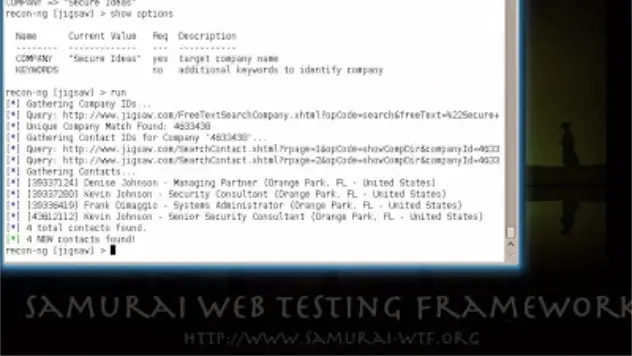
Now that I have my module loaded, I need to find out what data is required to start the search. show options displays each of the parameters for the module, their current values, and whether they are required. For this module, only the company name is required, so I’ll set that and then start the module:
recon-ng > show options
recon-ng > set company "Secure Ideas"
recon-ng > run

Another fun module searches Google for additional subdomains of the primary domain. This module only requires a domain name to search and continues searching until it has enumerated all of the subdomains that Google knows about. Another neat feature is that the module has built-in functionality to delay queries in order to prevent being blocked by Google:
recon-ng [jigsaw] > load recon/hosts/gather/http/web/google_site
recon-ng [web_archive] > show options
recon-ng [web_archive] > set domain secureideas.com
recon-ng [web_archive] > run

While recon-ng includes a lot of modules that query free sources, it also has a number of modules that require API keys or memberships to access the data.
Want to know what an attacker can learn about your organization?
Our team uses reconnaissance tools and OSINT techniques as part of every penetration test to identify your organization’s exposed attack surface. Reach out to discuss a security assessment.
Talk to Our Team